Active System Console Explained: 5 Proven Facts and Risks
Active system console is a phrase that shows up in server manuals, forum questions and error messages with little explanation, and it can point to more than one thing. In the sources I read, it is a web-based tool for checking server or appliance hardware, usually reached by typing an IP address into a browser.
This guide separates the meanings, walks through the one set of official steps I could read, flags weak claims and lists what I could not verify.
A note on method: I read a Skyhigh Security setup page, a 2015 Intel Community thread, a 2025 to 2026 GetAssist forum thread, a Coruzant article from April 2026, an ITRS Geneos documentation page and a general “system console” definition on Wikiwand. I did not run any of this software or log in to any device. I am not your vendor’s support team, so check your own hardware manual first.
What Is an Active System Console? The Short Answer
An active system console is a browser-based management page for a server or appliance. It shows hardware status and debugging details, and in some products it also lets an administrator change settings. The best-documented example I found is on Skyhigh Secure Web Gateway appliances. Intel also had a product called the Intel Active System Console, which the sources describe as a server management tool.
The name is not a single standard. Which one you have depends on your hardware, so confirm the maker before following any steps.
4 Things the Phrase Can Mean
| Meaning | What the source says | Source |
|---|---|---|
| Skyhigh appliance tool | Retrieves debugging information about the appliance hardware | Skyhigh setup page |
| Intel Active System Console | A server management tool, per a user’s question about running it on Windows Server 2008 R2 | Intel Community thread, 2015 |
| General system console | The text screen and keyboard where admin messages from the BIOS, kernel and logger appear | Wikiwand |
| Geneos Active Console | A separate Java and C++ monitoring application, not a hardware tool | ITRS documentation |
How the Active System Console Works on a Skyhigh Appliance
Skyhigh’s page says the tool retrieves debugging information about the appliance hardware. It also says Skyhigh recommends using the Remote Management Module instead of it, which makes the console the second choice.
Active System Console Setup Steps
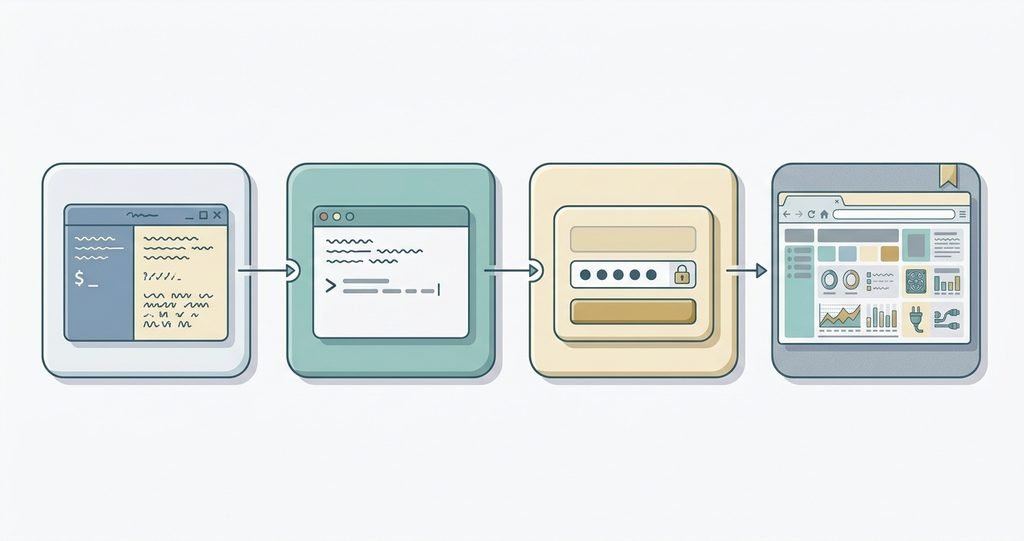
This is what Skyhigh’s page lists, with no version numbers given:
- Log on to the appliance over SSH from a system console.
- Run the command
asc-enable. - Create an administrator password when prompted. If a strong-password message appears, follow your organization’s rules.
- Open a browser and go to
https://<appliance IP address>:9393.
The page says the tool starts automatically when the appliance starts, and that asc-disable turns it off. The only requirements it lists are SSH access and a web browser.
The Intel Active System Console
An Intel Community post dated March 10, 2015 asks how to get the Intel Active System Console running on existing Intel hardware under Windows Server 2008 R2 Hyper-V Core. The only visible reply asks which system board the poster uses. The page doesn’t show whether the question was solved or what Intel’s support status is, so I can’t say whether the product is still supported.
A later forum thread, started on November 6, 2025, asks what an “Active System Console” message on a device means. The answers describe an enterprise management dashboard, and some name Dell iDRAC. None of the answers I read gives sources, and none explains the original poster’s message.
What a Blog Guide Claims
A Coruzant article by Usama Dilawar, dated April 15, 2026, calls an active system console a lightweight web app for monitoring server health without shutting systems down. It says the default login is admin/admin and advises changing it. It also lists ports 9393, 9191 and 7777 for a data-retrieval error.
Only port 9393 matches what I read in Skyhigh’s setup page. The article cites no vendor documentation, links to unrelated posts and includes FAQs about gaming consoles. Treat its details as leads to check, not instructions.
5 Risky Claims About the Active System Console
- “The default password is admin/admin.” I couldn’t confirm this in vendor documentation. Skyhigh’s steps make you set a password instead.
- “It works on every server.” The Intel thread shows a user asking whether it runs on Windows Server 2008 R2 Core, with no answer visible.
- “It is the same as iDRAC.” Forum replies mix the names together, but Dell iDRAC is a different product.
- “These ports are always required.” Only 9393 appeared in an official page I read.
- “It is the only management tool you need.” Skyhigh itself recommends another module first.
What Is Verified and What Is Not
| Claim | Status |
|---|---|
Skyhigh’s tool is enabled with asc-enable and opened on port 9393 | Stated on Skyhigh’s page |
| Skyhigh recommends the Remote Management Module instead | Stated on the same page |
| An Intel Active System Console existed | Shown by a 2015 Intel Community post |
| Intel still supports it | Not found |
| Default login is admin/admin | Claimed by one blog; not confirmed |
| Ports 9191 and 7777 are needed | Claimed by one blog; not confirmed |
| It is the same as iDRAC or Geneos Active Console | No; those are different products |
| Your device’s message refers to a specific product | Cannot tell without the maker and model |
Safety Habits for Any Management Console
These are general good practices, not steps from the sources I read:
- Keep it off the open internet. Reach management pages from a trusted internal network or VPN.
- Use a strong, unique password and change any default.
- Turn it off if you don’t use it. On Skyhigh,
asc-disabledoes this. - Follow the vendor’s manual. Version-specific steps differ.
- Write down what you change so you can undo it.
How to Work Out Which Console You Have
- Find the maker and model. Check the label on the device or the admin screen.
- Search the vendor’s own documentation for the exact phrase.
- Check the date. A 2015 forum answer may not fit current firmware.
- Ask who wrote the answer. Unsourced replies are opinions.
- Ask your IT team before you enable or change anything on a work device.
- Use the same steps elsewhere. We apply them in our guides to aicot, messagenal and hrmtaila.
Frequently Asked Questions
What is an active system console? A browser-based management page for server or appliance hardware, shown in vendor documentation and forum threads.
How do I access it? On Skyhigh appliances, you run asc-enable over SSH and open https://<IP>:9393. Other products differ.
Is it the same as a system console? No. A system console is the general text screen for admin messages, as Wikiwand describes it.
What is the Intel Active System Console? A server management tool that appears in a 2015 Intel Community post. I couldn’t confirm its current support.
Is it the same as Geneos Active Console? No. ITRS describes that as a separate monitoring application.
Is it safe to enable? Skyhigh’s page lists no warnings except a recommendation to use another module. Follow your vendor’s guidance and keep it on a trusted network.
What if I see the message on my own device? Note the exact wording and device model, then check the maker’s manual or support page.
Can I trust blog guides about it? Check them against vendor documentation. The one I read cites none.
Bottom Line
Active system console is not one product. It is a name for browser-based hardware management tools, with Skyhigh’s appliance version documented best and Intel’s older version visible mostly through forum threads. Confirm your maker and model, follow the vendor’s own steps and treat default passwords, port lists and “works everywhere” claims as unverified until the manual says so.